
Pelican Case Dimension Drawing
Pelican cases are widely used in engineering, field equipment, photography, defense, industrial transport, and technical storage because of their rugged construction and reliable protective performance. For teams working on custom foam inserts, mounting systems, packaging layouts, or enclosure-based product designs, having accurate CAD-style references is essential. This resource page is built to help designers, engineers, and procurement teams quickly access Pelican case CAD materials for concept development, specification work, and presentation-ready documentation.
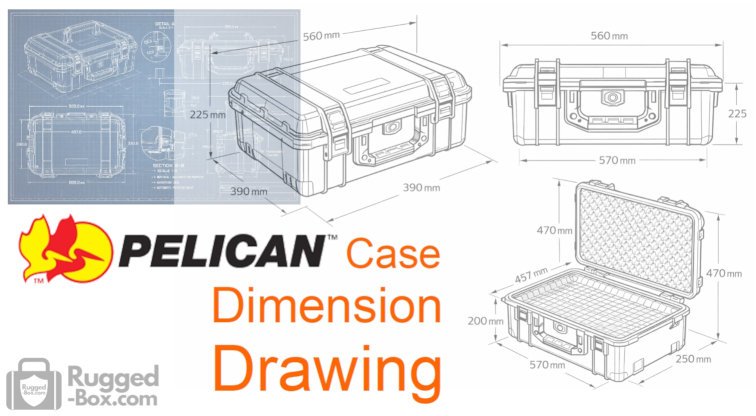
Resources for designers and engineers
This page is intended for professionals who need Pelican case CAD resources that are clean, readable, and practical. From simple line drawings to engineering-style views with measurements, these resources can support both technical workflows and marketing applications. If your team needs a visual reference for a rugged hard case in a specification sheet, concept deck, or product development document, CAD-ready assets make the process more efficient and more professional.
CAD Drawings (references)
- Pelican Case CAD download
- Peli Case CAD download
- 3Dfindit Pelican Products CAD Catalog
- Dassault Systèm 3D Content Central
- DIYsciBorg Pelican step file download
- GrabCAD Community (including CAD drawing for hard cases from non-Pelican Case brand)
- Free3D: 3D Pelican Case Models
- TurboSquid: Download Premium Pelican Case 3D Models
- cgtrade: 3D modelling for Pelican Case
- Sketchfab: Pelican Case models
- cults3d: Varies hard case models
Custom Products for Pelican Case
CAD resources for Pelican cases
Pelican case CAD resources help streamline the design process when a project depends on a protective hard case as part of the final solution. These resources are useful for evaluating external dimensions, internal usable space, lid depth, base depth, latch positioning, handle clearance, and foam insert planning. In many workflows, CAD references also support faster collaboration between industrial designers, mechanical engineers, fabricators, and end users.
Why engineering references matter
A high-quality Pelican case CAD reference can reduce guesswork during development. When teams are designing custom foam inserts, panel-mounted hardware, cable routing, or internal equipment layouts, engineering drawings and CAD-based visuals provide a more precise starting point than standard catalog images. Clear technical illustrations also improve communication in project proposals, presentations, production documentation, and client approvals.
Common uses for Pelican case CAD files
Pelican case CAD materials are commonly used for:
- custom foam insert design
- equipment fit verification
- protective packaging development
- mechanical layout planning
- product enclosure visualization
- dimensional review and clearance checks
- sales and technical presentation graphics
FAQ section
What are Pelican case CAD resources?
Pelican case CAD resources are technical reference materials used to support engineering, design, and product planning. They may include dimensional drawings, 2D layouts, 3D models, line illustrations, and measurement-based reference graphics.
Who uses Pelican case CAD files?
Pelican case CAD files are useful for mechanical engineers, industrial designers, packaging teams, fabricators, foam insert suppliers, and technical sales teams that need accurate case references.
Why use CAD resources for Pelican cases?
CAD resources improve accuracy when planning internal layouts, custom inserts, mounting components, equipment placement, and overall case integration into a product or transport solution.
Can Pelican case CAD drawings be used for presentations?
Yes. Clean engineering-style case drawings are often used in proposals, specification sheets, technical presentations, and webpages where a professional design language is important.
Are CAD resources useful for foam insert design?
Yes. CAD resources are especially valuable for foam insert planning because they help define usable interior space, wall thickness, lid foam area, and component placement.